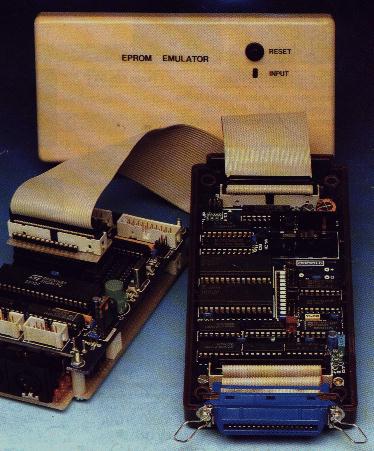
The EPROM Emulator, presented here by Keith Rickard, can be used with the Z88 to make developing ROM-based applications easier.
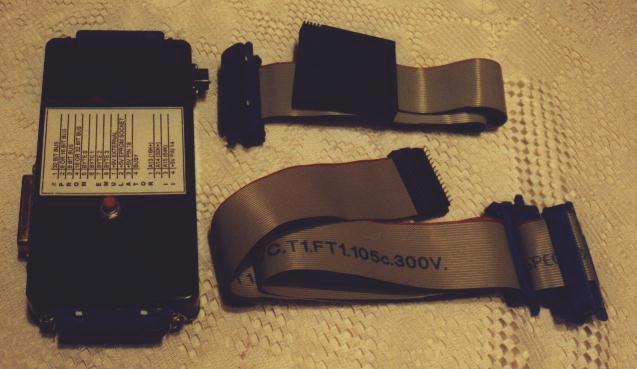
The Eprom emulator is a device which is connected to the parallel port of your PC (or Amiga) and allows you to send a Z88 Eprom image from a file to the emulator, using the DOS command: COPY filename LPT1:/B
The other end of the emulator is connected to a special card which is plugged into a slot in the Z88. The upshot is that the Z88 thinks it has a bona fide Eprom card in its slot and reacts to the image in the normal way. It could be an application or simply a file Eprom.
It can emulate 8K (not that useful!), 16K, 32K and 64K Eprom cards. It takes about 5 seconds for the image to be download from the PC. Obvious uses for this device (as deployed by myself) are improved ease for developing Z88 applications, downloading files to the Z88 and looking at other peoples application ROM images (have had Manic Miner and Camelot working through it!).
Building the EPROM emulator
 From pages 14 to 20 of the ELEKTOR ELECTORNICS SEPTEMBER 1992 magazine.
 EPROM EMULATOR II
 This is a revamped version of an EPROM emulator we published about three years
 ago.  This time we propose to build the circuit with standard size components
 rather than SMA (surface mount assembly) components, which some of you have
 found difficult to obtain as well as handle.  The present version of the
 emulator has a RAM of 64 KByte, and is capable of emulating 2764s up to and
 including 27512s.  Also, by parallel connection of Centronics cables,
 extensions to bus widths of 16 bits or 32 bits are easier than before.
 MAIN SPECIFICATIONS
 �    Emulates EPROMs 2764 through 27512
 �    Connected to Centronics port
 �    Auto reset function
 �    8-, 16- or 32-bit configuration
 �    No driver software required; use is made of existing system
     utilities (MS-DOS, Windows, ST and Amiga)
 Design by B.C. Zschocke and N. Breidohr
 AN EPROM emulator replaces the EPROM in a computer system (to which a program
 is to be developed) by RAM that behaves like an EPROM.  The advantages are
 well-known: the contents of the RAM can be overwritten as many times as you
 like, and the data transfer from the PC (running an assembler) to the target
 system is much faster.  Errors in the object program are thus easily and
 quickly corrected, because it is no longer necessary to remove the EPROM,
 erase it, and reprogram it.
 The data transfer from the PC to the emulator described here does not require
 special file formats like Intel-Hex, Tektronics or Motorola.  Instead,
 standard system utilities can be used to output the previously prepared binary
 file via the Centronics port.
 Application range
 The present emulator replaces the byte-organized EPROMs with a capacity of
 8 KBytes (2764) to 64 KBytes (27512).  The now obsolete 2-KByte and 4-KByte
 EPROMs Types 2716 and 2732 may also be emulated with the aid of a specially
 prepared adaptor board. Up to four emulators may be connected in parallel
 to 'attack' systems with a bus width of 32 bits.  The EPROM data may be
 furnished by any computer system with a Centronics port.  The STROBE pulses
 supplied by the computer have four functions.
 (1) they indicate that the data is stable and valid;
 (2) they enable the emulator;
 (3) they clock three-state counters IC7, IC8 and 1C9; and
 (4) they select a particular emulator in 16-bit or 32-bit systems.
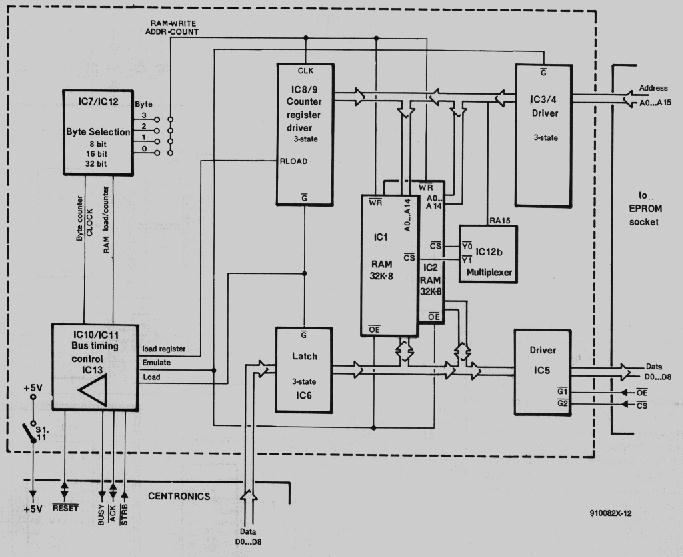
 The counter outputs address two RAM ICs with a capacity of 32 Kbyte each. The
 data applied to the input of the emulator is 'acknowledged', and copied
 directly into the RAM.  The selection of the RAMs is accomplished via A15 of
 counter IC9, and one half of IC12.  After the last byte has been stored in
 the RAM, the counter is switched to high-impedance output mode
 ('three-state'). The individual RAM addresses are then available for selection
 through the address buffer, and can be read via the data output buffer.  The
 addressing of the RAM at this stage is accomplished by the host system, i.e.,
 the computer system or (more generally) application circuit whose EPROM is
 emulated.
 Circuit description
 Essentially, the circuit consists of three blocks:
 (1) A control section around IC10 and IC11, which serves to ensure the
 proper bus timing on the Centronics interface, and generate a number of
 internal signals.  This section also supplies the RESET signal for the
 application circuit (Auto-RESET).  All signals are taken to the 'outside
 world' via open-collector buffers/drivers contained in IC13.  One driver
 serves to generate the strobe signal.
 (2) A byte selection circuit (IC7 and one half of IC12), which arranges the
 distribution of the received 8-bit data between parallel emulators in 16-bit
 and 32-bit applications.  This circuit is required only if a 16-bit or 32-bit
 extension is envisaged.
 (3) A RAM address and load address generator consisting of a counter (IC8 and
 IC9) that supplies the RAM addresses during loading, a latch (IC6) for
 intermediate storage of Centronics databytes, and drivers (IC3, IC4 and IC5)
 that interface to the EPROM socket in the application circuit. Depending on
 the mode of operation of the circuit (loading or emulating), either the
 counter/latch combination or the EPROM socket interface are in control of the
 EPROM addresses and data.
 Since 64-Kx8-bit RAMs are not easily obtained at reasonable prices, the
 present emulator is based on two 32-Kx8-bit RAMS.  These offer a total storage
 capacity of 64 KByte, and allow the emulator to mimic EPROMs up to and
 including the 27512. When smaller EPROMs are used, address lines A15
 (27256), A15/A14 (27128) or A15/A14/A13 (2764) must be tied to ground via
 the appropriate jumpers (see Table 1).
 Operation in detail
 The Centronics standard stipulates that data must be stable for a certain
 time before and after the STROBE pulse.  This ensures freedom of using either
 the leading or the trailing edge of the strobe signal to capture data from
 the printer's Centronics input.  In the emulator, both edges are used.
 At power-up, R7 and C7 provide a defined state. Bistables IC11a and IC11b
 are set, while bistables IC10a and IC10b are reset. IC1lb clears all
 counters, and switches the circuit to the emulate mode. With reference to
 the timing diagram of the 8-bit version (Fig. 2), the negative edge of the
 STROBE signal triggers IC10b, and resets IC1la and IC11b. Next, IC11b
 switches the circuit to load mode, and actuates the RESET line. IC11a
 actuates the Centronics BUSY line, and the positive edge at its output causes
 the counter state to be transferred to the counter register, and the
 Centronics databyte to be transferred to the latch.  Data and address are
 allowed to stabilize at the respective RAM inputs while the STROBE pulse
 lasts.  The positive edge of the STROBE pulse triggers IC10a, and actuates
 the RAM WRITE signal and the Centronics ACKNLG (acknowledge) signal during
 the monotime of IC10a.  The signal edge that marks the monotime sets IC11a,
 and so clears the BUSY signal. At the same time, the counter is advanced one
 state. The first byte has been stored in RAM, and the circuit is ready to
 receive the next byte. A byte received within the monotime of IC10b causes
 this monostable to be triggered again. Otherwise, the above cycle starts
 again on detection of the negative edge of the STROBE pulse.  If no databyte
 is received during the monotime of 1C10b, the circuit switches to emulate
 mode, clears the RESET signal, switches the counters to three-state, and
 resets them. At this point, the RAM addressing is taken over by the
 application circuit.
 To prepare the circuit for use in 16-bit or 32-bit applications, 1C7 and one
 half of IC12 divide the internal RAM WRITE and counter output signals.
 Depending on the jumper setting, either the each first, second, third or
 fourth byte is copied into the latch, while the counters receive an
 appropriately reduced number of clock pulses.  The RAMs are switched via
 their CS (chip select) lines, with the aid of address line A15 and the other
 half of IC12.
 At first glance, the outputs Of IC10b and IC11b behave identically.  Why,
 then, are both used?  The timing diagram shows an unexpected, rather
 unwelcome, quirk of the monostable, IC10b.  At the (relatively long)
 monotime, the time between the triggering instant and the output actuation
 instant is not short enough.  This caused problems in a number of prototypes.
 The trigger signal supplied by IC10b actuates IC11b instantly, while IC11b
 is de-actuated again by the negative edge Of IC10b. Capacitor C6 may also
 cause trouble if it cannot be discharged quickly enough by IC10.  Increasing
 its value must, therefore, be done with care.
 LED D1 lights when the computer feeds data into the emulator.  The
 (active low) RESET signal is taken to the application circuit via connector
 K2.  On completion of the load activity, the emulator releases the RESET line,
 and so re-starts the application circuit, which subsequently runs its new
 software contained in the emulator RAM.
 The emulator is powered either by the application circuit (via Sl-10), or by
 the onboard stabilizer (via S1-9), whose input is connected to a small mains
 adaptor with d.c. output.  Whether or not an external power supply is
 required is, of course, dependent on the capacity of the target system's
 power supply. A power supply conflict may arise when the emulator is powered
 by the application circuit, and this is switched off, or powered down during
 reset, while the 'other side' of the emulator is connected to the PC (which
 is still on) via a Centronics cable. If this happens, the emulator is powered
 via the protection diodes in the Centronics interface of the PC. This results
 in a supply voltage of about 3V, which is sufficient for the RAMs to retain
 their data, but not for the TTL circuits to operate properly. If, in this
 condition, the application circuit is switched on, the emulator may go into
 an undefined state, which may be ended by pressing a button connected between
 point 'S' and ground.  A better solution, however, is to power the emulator
 from an external source via IC14. The previously described power supply
 conflict may also damage the emulator, because the current sent into the
 application circuit via the EPROM socket may become so high that the driver
 Ics are destroyed.
 Practical hardware
 The printed circuit board designed for the EPROM emulator is a high-density
 double-sided, through-plated type, which is best purchased ready-made through
 our Readers' Services.  Space is pretty tight on the board, so keep an eye on
 the pitch of the capacitors.  Capacitor C11 is fitted at the solder side of
 the board, underneath IC1.
 Pin header K1 is suitable for two types of connection: its pinning is
 compatible with a 25-way sub-D connector (allowing ready use of IDC-style
 connectors), as well as with a 36-way Centronics socket.  When the latter
 is used, make sure to remove pins 4 and 6, or cut the relevant tracks.
 When a 25-way sub-D connector is used, it is, unfortunately, not possible to
 create a 'loop-through' connection for the supply voltage.  To reduce cost,
 a 40-way IDC socket was used on the prototype - a 26-way type (for connection
 to sub-D plug) is, of course, also possible.
 The 16-bit and 32-bit versions of the EPROM emulator require two or four
 col plete circuits, respectively, which are driven by a common line, for
 instance, via four IDC-style Centronics plugs. The jumper settings on each
 board may be found in Table I The emulators are mutually synchronized via the
 ACK line on the Centronics interface The BUSY line may be connected on one
 board only (S1-12).  In case the emulators are to be powered by a single,
 external, supply this is connected to one board only, from where the supply
 voltage is distributed via pin S1-11 on each board. On the board from which
 the supply voltage is distributed, S19 must be closed. On all other boards,
 Sl-9 is open. Sl-10 must be closed on all boards.
 Software
 As already mentioned, special software is not strictly required.  The emulator
 RAM can be loaded with the aid of any system capable of outputting binary
 files in form, via the Centronics port. This that the EPROM emulator can be
 used with any computer sporting a Centronics-com ipatible printer port.
 Users of MS-DOS PCs may want to obtain version 2.0 of EPROMSIM, a program
 which is available on disk through our Readers Services as item ESS129.
 EPROMSIM supports EPROMs up to 64 KByte, and is capa ble of handling the
 following 'intelligent file formats:
 � Intel Intellec-8;
 � Tektronix hexadecimal;
 � Motorola.
 Construction
 When building the circuit, remember to remove pins 4 and 6 of the Centronics
 socket if used.  To ensure ready access, the DIP switch array is best mounted
 on IC sockets.  Alternatively, you may want to fit the switches at the solder
 side of the board, and cut a clearance in the back panel of the enclosure.
 The LED wires may be extended to enable the LED to be fitted in a hole in the
 cover panel.  Further constructional points that deserve your attention are
 the mounting of the Centronics input socket, and the strain relief on the
 flatcable to the EPROM adaptor.
 The EPROM adaptor is home-made. As shown in Fig. 5, it consists of a piece
 of strip board, two lengths of IC pin strip, a box header and two 28-way
 IC sockets. The flatcable from the EPROM emulator is fitted with a 28-way
 IDC socket. You may want to make one adaptor for each EPROM type, and wire
 jumpers A13, A14 and A15 appropriately, direct on the socket.  Wires 29 to
 34 of the flatcable are connected to the RESET generator on the emulator
 board, and may also be taken to the adaptor socket to create a RESET
 connection for the application circuit.
 DOWNLOADING TO THE EPROM EMULATOR
 PC/MS-DOS    COPY  LPT1:/B (/B for binary output)
 Amiga    COPY  PAR: (PAR:, not PRT:)
 TOS    On the ST it is sufficient to double-click on the filename shown on
     the desktop, and then output to 'printer'.  It should be noted,
     however, that the TOS appends a CR/LF sequence to each file.
     This means that the last two bytes of a 32-Kbyte file can not be
     used.  However a simple printer manager that does not output the
     CR/LF sequence should not be too difficult to write in Pascal, C
     or BASIC.
 COMPONENTS LIST
 Resistors:
 6    10k Ohm             R1;R2;R4;R5;R8;R12
 1    470 Ohm             R3
 1    1M Ohm              R6
 4    100k Ohm            R7;R9;R10;R11
 2    7-way 10k Ohm SIL       R13;R14
 Capacitors:
 Pitch 0.2 inch (5mm)
 1    470uF 16V radial        C1
 2    330nF               C2;C7
 11    100nF               C3;C8-C18
 1    1nF             C5
 Pitch 0.1 inch (2.5)
 1    100uF 16V radial        C4
 1    2uF2 16V radial         C6
 Semiconductors:
 1    LED, green, 3mm         D1
 2    62256 (<100ns)          IC1;IC2
 3    74HCT541            IC3;IC4;IC5
 1    74HCT574            IC6
 3    74HC590             IC7;IU8;IC9
 1    74HCT123            IC10
 1    74HCT74             IC11
 1    74HCT139            IC12
 1    7407 (or 74LS07)        IC13
 1    7805                IC14
 Miscellaneous:
 1 12-DIP switch block, or 24-way pin header block with jumpers
                     S1
 1    40-way box header       K1
 1    34-way box header       K2
 1 40-way IDC socket
 1 34-way IDC socket
 1 IDC Centronics socket
 1 TO-220 style heatsink
 1    Printed circuit board       910082
 1 ABS enclosure; approx. size 160x80x32mm
 IC sockets
 28-way DIL adaptor (see Fig.5)
 Approx 50cm 36-way flatcable
 Per the September 1992 magazine, the circuit board 910082 can be purchased
 for �8.50 + VAT (�9.99) from:
 ELEKTOR ELECTRONICS (PUBLISHING)
 P.O. BOX 1414
 Dorchester
 DT2 8YH
 England
 Method of payments available:
 � Bank draft
 � Cheque (made payable to Elektor Electronics)
 � Giro transfer (account no. 34 152 3801)
 � Postal order
 � Visa, Acces, Mastercard, Eurocard.